
Skip to content

Developer engineering settings

Developer mode

This feature appears in Developer mode.

  1. Open Menu → Device Info.
  2. Tap the firmware version five times, with no more than 2.2 seconds between taps.
  3. Return to the menu and open the indicated feature.

Use the menu’s Developer Mode toggle to return to the normal interface. Developer mode changes which controls this browser displays; entering it does not change saved controller settings.

Overview
Details

Use the actual board, motor and system requirements to justify an engineering change. These controls affect output behavior and have no universal preset.

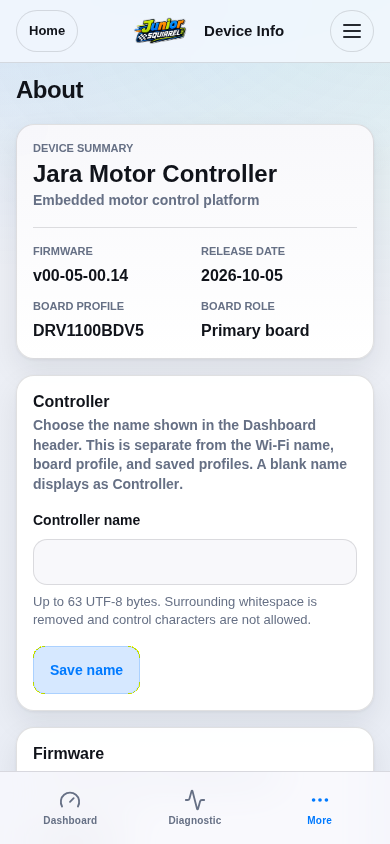
Open Menu → Device Info and record the board/profile and firmware version. Keep the canonical board limits and a known configuration export available.
Part 1 / 2
Check your board before editingSimulation
Production route rendered from firmware-served assets; board features reflect DRV1100BDV5.
View 1 / 3

Enlarged screen

Production route rendered from firmware-served assets; board features reflect DRV1100BDV5.

Capture details

Production route rendered from firmware-served assets; board features reflect DRV1100BDV5.

Evidence
Development Hub simulation · DRV1100BDV5
UI state
mode-normal has-floating-action-rail has-sticky-primary-action
Viewport
390 × 844 · actual viewport
Page position
0, 0 px
Scenario
hub/default-configuration.yaml
Virtual time
301728 µs
Route
/about.html

Choose a topic