
Skip to content

Diagnose status, inputs & faults

Overview
Details

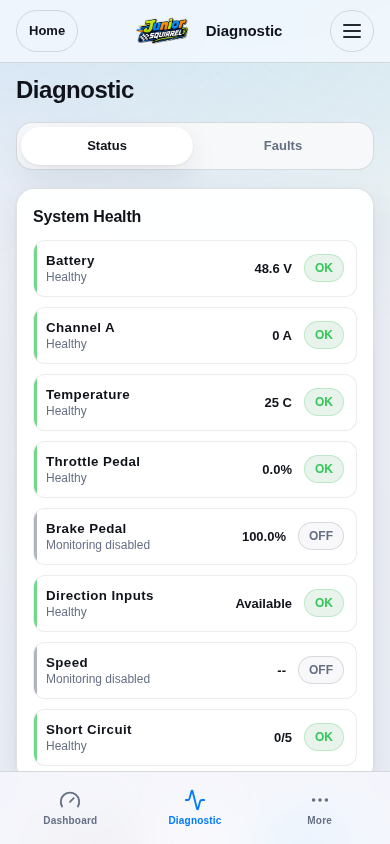
Secure the mechanism and record the expected behavior and which input should command it. Open Diagnostic → Status.

Read System Health and wait for current data. Check whether output is disabled, an input command is missing or a fault restriction is active.
Step 1 / 5
Open Status and read System HealthSimulation
Production route rendered from firmware-served assets; board features reflect DRV1100BDV5.
View 1 / 1

Enlarged screen

Production route rendered from firmware-served assets; board features reflect DRV1100BDV5.

Capture details

Production route rendered from firmware-served assets; board features reflect DRV1100BDV5.

Evidence
Development Hub simulation · DRV1100BDV5
UI state
mode-normal has-floating-action-rail has-sticky-primary-action
Viewport
390 × 844 · actual viewport
Page position
0, 0 px
Scenario
hub/default-configuration.yaml
Virtual time
301728 µs
Route
/diagnostic.html

Choose a topic