Skip to content

Update paired firmware images

Overview
Details

Keep controller power and the local connection stable throughout the update. Keep the original image files and a configuration export.

Open Menu → Update. Select app_<version-token>.bin and storage_<version-token>.bin from the compatible release for your exact board. The version tokens must match.
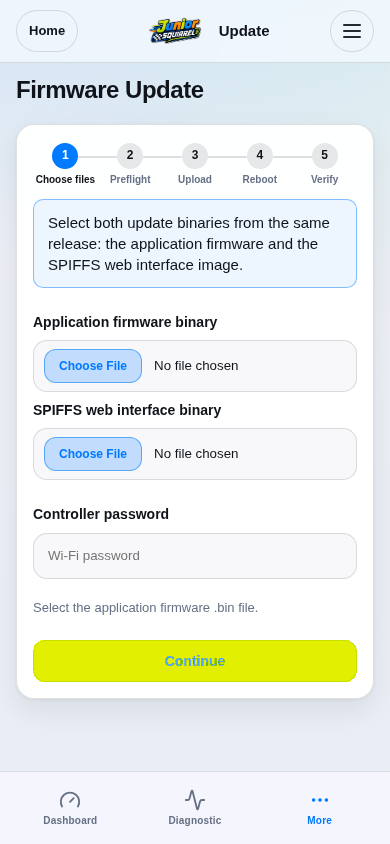
Step 1 / 5
Choose the exact matching image pairSimulation
Production route rendered from firmware-served assets; board features reflect DRV1100BDV5.
View 1 / 1

Enlarged screen

Production route rendered from firmware-served assets; board features reflect DRV1100BDV5.

Capture details

Production route rendered from firmware-served assets; board features reflect DRV1100BDV5.

Evidence
Development Hub simulation · DRV1100BDV5
UI state
mode-normal
Viewport
390 × 844 · actual viewport
Page position
0, 0 px
Scenario
hub/default-configuration.yaml
Virtual time
301728 µs
Route
/settings-ota.html

Choose a topic